Short answer: a QR code itself never expires. The black-and-white pattern is just data, and it will scan in ten years exactly as it scans today. What can expire is the service a code depends on, or the page it points to. That difference explains almost every "my QR code stopped working" story. Here is how it happens, how to check a code before you print it, and how to make codes that keep working for as long as your signs, packaging and business cards are in use.
Static QR codes never expire
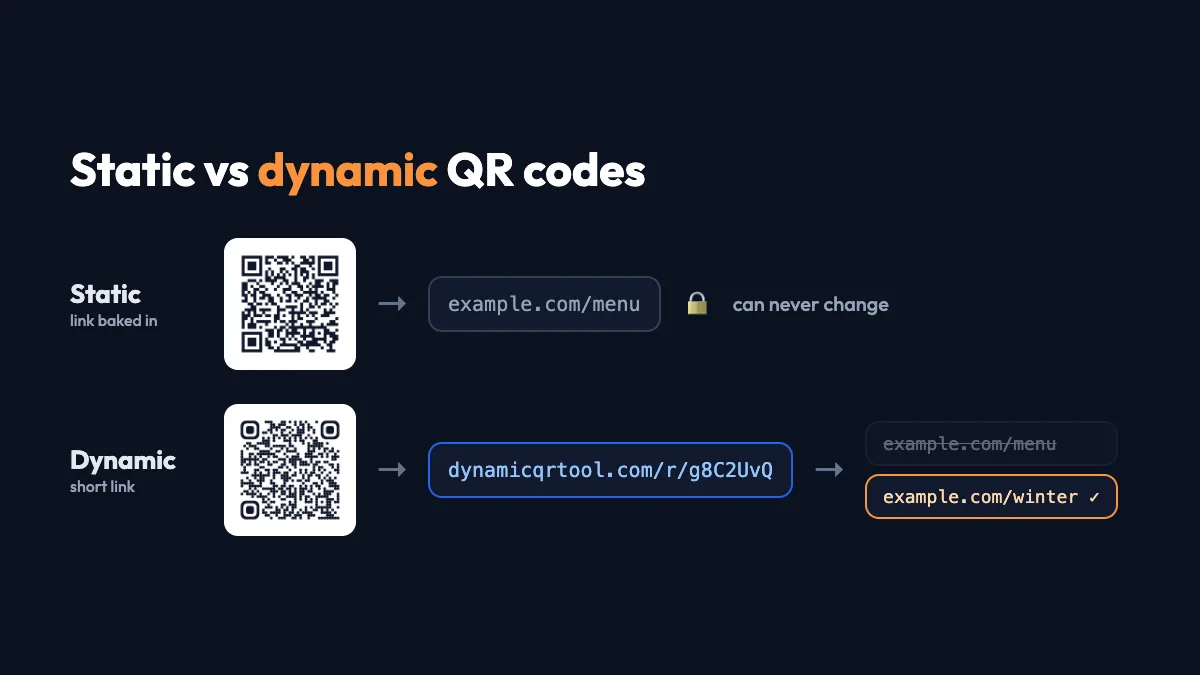
A static QR code contains its content directly: a link, a WiFi password, a contact card. A phone decodes it without asking any server. There is nothing to switch off, so a static code works for as long as it is physically readable. If you used a website to generate it, that website can shut down tomorrow and your printed code won't notice.
The catch is that a static code can't be changed. If the link inside it breaks, the code is still "working" in the technical sense, but it sends people to a dead page. If you want the full comparison first, read static vs dynamic QR codes.
Dynamic QR codes can expire, and here is why
A dynamic QR code contains a short link to the generator's own server, which then forwards people to your real destination. That is what makes it editable and trackable, and it is also its weak point. If the redirect stops, every printed copy stops with it.
There are four common reasons a dynamic code "expires":
- The free trial ended. Many generators let you create dynamic codes for free, then deactivate them after a trial period unless you subscribe. The code often keeps redirecting, but to a page asking the owner to upgrade, which is the worst possible thing to show your customers.
- The subscription lapsed. A card expired, someone who left the company owned the account, or the plan was cancelled during a budget review.
- A scan limit was reached. Some plans cap scans per month. A successful campaign hits the cap and the code stops at the busiest moment.
- The service shut down. Smaller tools disappear, get acquired or change their terms.
A QR code is only as permanent as the thing it points to. Static codes point to their own content; dynamic codes point to a service. Know which one you are printing.
The other ways a code can "stop working"
Not every failure is about subscriptions. Before blaming the generator, rule these out:
The destination page is gone
Websites get rebuilt and URLs change. A menu PDF is replaced with a new file name, or a campaign page is deleted when the campaign ends. The code scans perfectly and lands on a 404. With a dynamic code you can fix this in seconds by pointing it at the new page. With a static code you have to reprint.
The print is damaged or faded
Outdoor signs fade in the sun, laminated table cards get scratched, and stickers peel at the corners. QR codes include error correction, so a damaged code can still be read (level H tolerates roughly 30% damage), but there are limits. Large missing areas, especially over the three corner squares, will defeat any phone. Printing the code larger, with high contrast and a clear margin around it, buys you years.
The code was printed too small or with poor contrast
This one is "expired" from day one. Light grey on white, codes squeezed into a corner, or a stylish inverted design can fail on older phones. Test before printing, with more than one phone.
How to check whether your code will expire
Before you send anything to print, spend five minutes on these checks:
- Scan it and watch the address. If the first address you see belongs to the generator (a short link on their domain), the code is dynamic and depends on that service.
- Read what happens after the trial. Look for words like "trial", "deactivated", "scan limit" or "upgrade to keep your codes active" on the pricing and FAQ pages.
- Check who owns the account. Use a shared team email, not a personal one that disappears when someone leaves.
- Confirm you can edit it. Make sure you know where the dashboard or manage link is before you print. That's how you'll fix a broken destination later.
- Think about lifetime. A flyer for a weekend event needs a code that lasts a month. Product packaging, building signs and business cards need codes that last years.
How to make QR codes that last
Use static codes where the content won't change
WiFi credentials, contact cards and plain text are perfect static codes. They have no dependency and no account.
Use a dynamic generator with no trial and no scan cap
For anything that links to a web page, you still want a dynamic code, because the ability to fix a link after printing is worth it. Just choose a service that doesn't deactivate codes. On Dynamic QR Tool, dynamic codes are free, have no expiry date and no scan limit, and there is no paid plan behind them. You can keep a code in an optional account or use a private manage link, and you can edit, pause or delete it at any time.
Watch the scan numbers
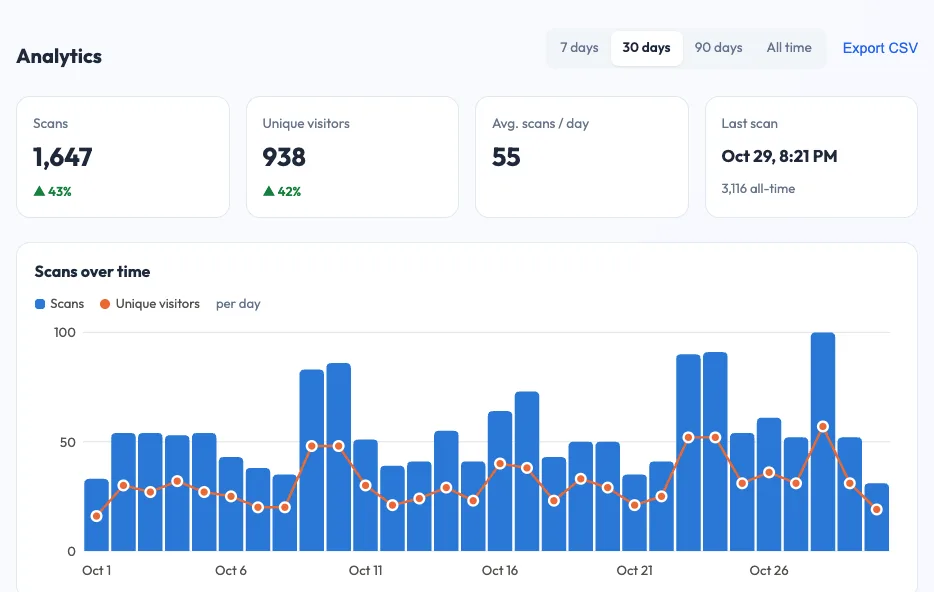
A code that is working shows a steady stream of scans. A sudden drop to zero on a code that used to be busy is an early warning: the sign may be damaged, blocked or removed. That's why scan analytics are useful even for "set and forget" codes on product packaging and permanent signs.
Point to a page you control
For extra resilience, point your dynamic code at a page on your own website rather than a third-party file link. Then you can update the page without touching the code, and the code can be redirected if you ever reorganise the site.
What to do if your code has already expired
- Trial or subscription expiry: you can usually reactivate the code by paying, which restores every printed copy. Weigh that against reprinting with a code that won't expire.
- Service shut down: the printed code can't be rescued. Cover it with a sticker carrying a new code and reprint at the next opportunity.
- Destination page deleted: if the code is dynamic, update the destination. If it is static, put a redirect on your website from the old URL to the new page. That's often possible even when you can't reprint.
The bottom line
QR codes don't have a built-in expiry date. Static codes last as long as the print does. Dynamic codes last as long as the service behind them keeps redirecting, so pick one without trials, scan caps or surprise deactivation, and keep access to the dashboard. Do that, test before you print, and your codes will keep working long after the poster has faded.