For a small business, a QR code is the cheapest bridge between the physical world (your counter, window, bag or van) and everything you have online. The problem isn't making one; it's knowing which ones are worth printing. This list collects 30 practical QR codes for small business owners, grouped by what they do for you: get found, bring people back, sell more, save time, and run the place. Each idea notes where the code goes and what it should point to.
Before you start: three rules that make every idea work
- Use dynamic codes. Offers, hours and links change. A dynamic code lets you change the destination without reprinting. If that's new to you, read static vs dynamic QR codes first.
- One code per placement. A separate code for the window, the receipt and the counter card means each gets its own scan count, so you learn which spots work.
- Always say what people get. "Scan for 10% off your next visit" beats a bare code every time.
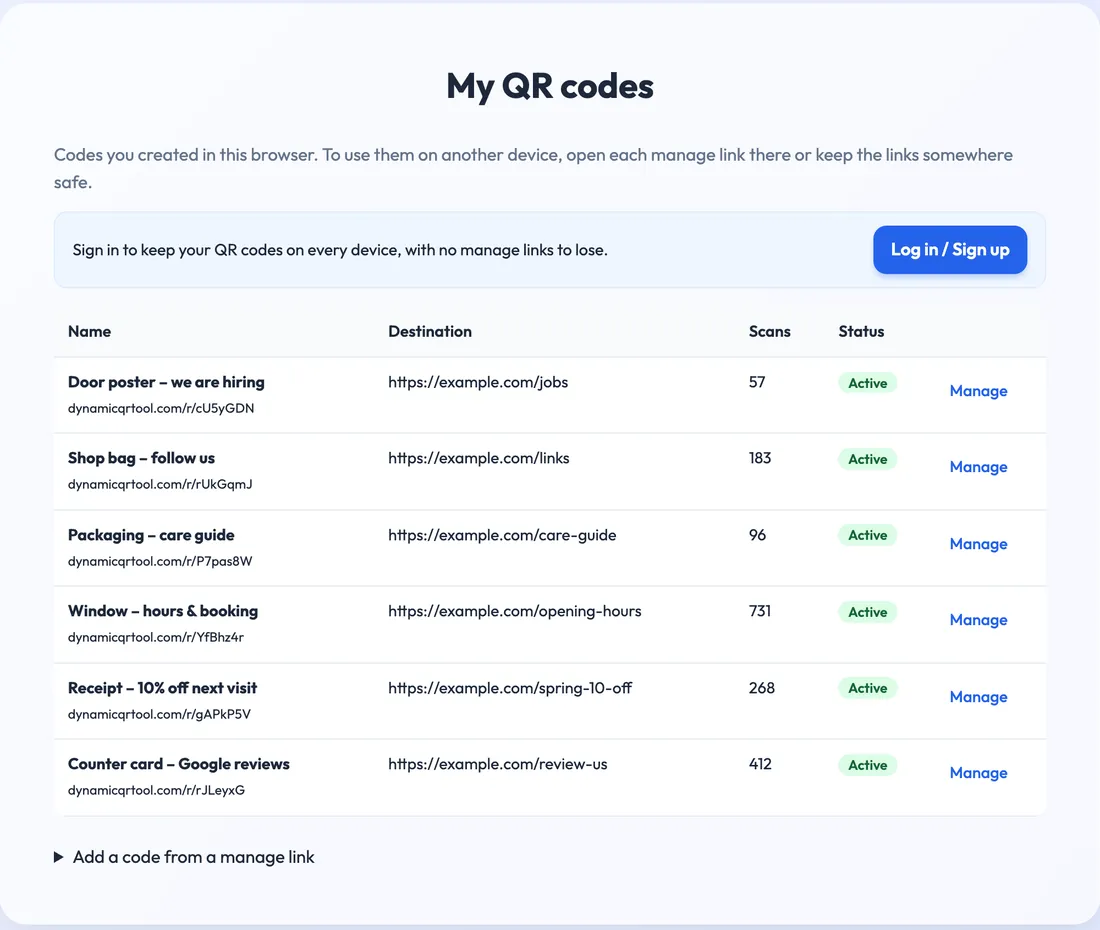
That's what a small shop's set can look like after a month and a half: six codes, each named after where it's printed, each with its own count. The window clearly earns its place; the hiring poster can come down once the job is filled.
Get found and trusted (ideas 1–6)
- Google review card at the till. Point a code straight at your review form. The best moment is right after a good experience. The Google reviews QR code page shows how to get the right link, and our Google review link guide walks through it.
- Window sign with hours and booking. Passers-by after closing time can still book or check when you open.
- Directions on flyers. A code to your map location for anyone hard to find.
- Social profile on bags and packaging. One link-in-bio page, so people can choose Instagram, TikTok or your newsletter.
- "About us" story on the wall. A short page or video about the founder, the makers or the sourcing. People love provenance.
- Business card for the owner. A contact card that opens your details, so new suppliers and customers don't type a phone number.
Bring customers back (ideas 7–12)
- Next-visit discount on receipts. "10% off your next visit within 30 days." Point the code at a page with the offer and update it each month. See coupons and promotions QR codes.
- Newsletter sign-up at the counter. Offer something small in return: a recipe, a care guide, early access to sales.
- Loyalty programme sign-up, if your loyalty app has a web sign-up page.
- Seasonal page on the door. The same printed code points to the summer menu, then the holiday opening hours, then the January sale.
- Event calendar. Workshops, tastings, live music: one code that always shows the next event.
- Refer-a-friend offer printed on gift cards or thank-you notes.
Sell more (ideas 13–18)
- Online ordering from the window, so people can order ahead or after hours. Use an online ordering QR code.
- Shelf labels that open product details: reviews, ingredients, sizes, colours you don't have in stock but can order.
- Gift cards online, on a counter sign in December.
- Product demo videos next to items that need explaining (a coffee grinder, a craft kit).
- Restock page on packaging. When the customer runs out at home, the code on the box takes them straight to reordering.
- Catering or bulk orders on menus and flyers for offices nearby.
Save time and answer questions (ideas 19–24)
- Guest Wi-Fi at cafés and waiting areas, so staff stop reading out passwords. (Wi-Fi codes are static by nature; see our guest Wi-Fi guide.)
- FAQ page by the counter: returns, delivery areas, parking, allergens.
- Care and assembly guides on packaging, so people don't call or email.
- Warranty registration for products that need it.
- Appointment booking on business cards and the door for salons, repair shops and studios.
- Price list or service menu you update online instead of reprinting laminated sheets.
Run the business (ideas 25–30)
- "We're hiring" poster on the door, linking to the job description and application form. A hiring poster QR code can be paused when the role is filled.
- Customer feedback survey on receipts or table cards. Short, three questions at most.
- Digital tips at the counter for cafés and service businesses.
- Staff handbook or opening checklist in the back room, always the latest version.
- Equipment manuals on the machines themselves: the coffee machine, the till printer, the freezer.
- Supplier and delivery instructions at the back door: where to unload, who to call.
You don't need 30 codes. Pick three that match a real problem (not enough reviews, quiet weekdays, the same question asked ten times a day) and measure them for a month.
Where to place them
A great idea in the wrong spot gets no scans. A few rules from where to put a QR code:
- Put codes where people wait: queues, tables, counters, waiting chairs.
- Eye level, good light, no glare. Avoid shiny laminate in sunny windows.
- Big enough for the distance. A counter card can be small; a window sign read from the pavement can't.
- Test every code in place with two phones before you leave it there.
How to measure what works
Each dynamic code has its own dashboard: total scans and unique visitors, scans over time, a day-by-hour heatmap, and breakdowns by device, operating system, country and city, with CSV export. For a small business, three questions matter most:
- Which placement gets scanned? Compare codes, not just totals.
- When do people scan? If the window code peaks after closing time, online ordering or booking is worth pushing.
- Did a change help? Move the review card from the table to the till for two weeks and compare.
Scans tell you interest, not sales. Pair them with what happens next: new reviews, newsletter sign-ups, coupon codes redeemed at the till.
Common mistakes to avoid
- One code for everything, so you can't tell what works.
- Linking to your home page instead of the exact page the sign promises.
- Pages that don't work on phones. Every scan is on a phone.
- Forgetting old codes. Expired offers are worse than none. Update or pause them.
More pitfalls are in QR code mistakes that kill your scan rate. When you're ready, make your first three codes on the free dynamic QR code generator: no account needed, no expiry and no scan limit.