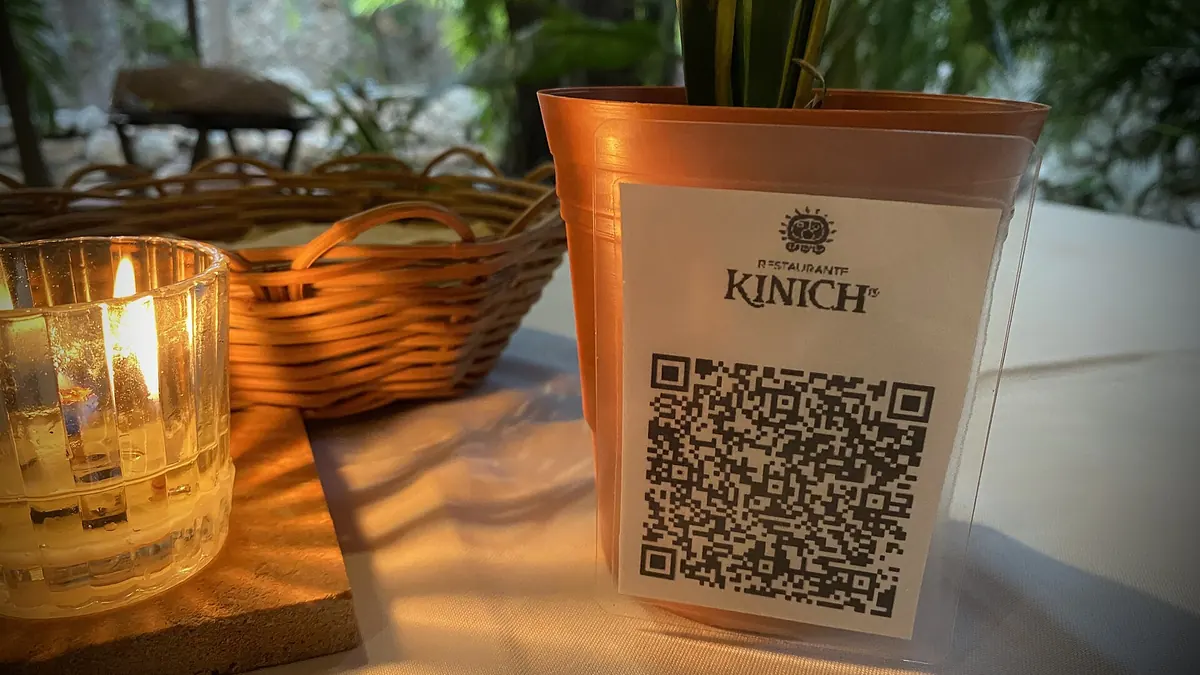
A QR code menu lets guests open your menu on their own phone by scanning a code on the table. Done well, it means no reprinting when prices change, a menu that's always up to date, and photos and allergen details you could never fit on paper. Done badly, it means a blurry sticker that leads to a 12 MB PDF nobody can read. This guide covers the whole job: which kind of menu to link, why the code itself should be dynamic, how to print and place it, and how to use scan data to run the restaurant better.
Three kinds of QR code menu
Before you make a code, decide what it opens. Most restaurants pick one of these:
| Menu type | What it is | Good for | Watch out for |
|---|---|---|---|
| PDF menu | Your existing menu file, hosted online | Fast to set up, looks exactly like the printed menu | Large files load slowly; small text needs zooming on phones |
| Web menu page | A page on your website or a menu builder | Readable on phones, easy to update, can show photos and allergens | Someone has to keep it current |
| Order-and-pay system | A menu that takes orders and payment at the table | Busy venues, bars, counter-service places | Monthly fees; changes your service style |
For most independent restaurants, a mobile-friendly web page is the sweet spot. If a PDF is all you have, it works, as long as you compress it and use a large font. Our guide to making a QR code for a PDF covers file size and hosting.
Why your menu QR code should be dynamic
A static QR code stores the menu address inside the pattern itself. Change the address (new website, new menu system, new PDF file name) and every printed code is dead. In a restaurant, codes live on dozens of table tents, stickers and window signs, so reprinting is a real cost.
A dynamic code stores a short redirect link instead. You can point it at a new menu any time, from your phone, and every printed code follows. For menus that means:
- Switch between lunch and dinner menus. Edit the destination when service changes (it takes seconds on the manage page); the same table code follows.
- Swap seasonal menus without touching the tables.
- Move from a PDF to a web menu (or to an ordering system) later, without reprinting.
- Pause the code if the menu page is down, instead of sending guests to an error.
The free restaurant menu QR code generator creates a dynamic code in about a minute, with no expiry and no scan limit.
Print the code once and treat the menu as the thing that changes. Prices, dishes and even your menu software will change; the table tents shouldn't have to.
Step by step: make a QR code menu
- Get your menu online. Publish the web page or upload the PDF and copy its link. Open it on a phone over mobile data to check it loads quickly.
- Create a dynamic code. Paste the menu link and give the code a name you'll recognise later, such as "Table tents – main room".
- Save the manage link (or log in) so you can edit the destination and see stats later.
- Style it. Add your brand colour (keep it dark on a light background), and a frame with a clear label: "SCAN FOR MENU" works better than "SCAN ME".
- Download SVG for print and PNG for social posts or your website.
- Test it with an iPhone and an Android phone, in the actual lighting of the room. Our pre-print test checklist takes five minutes.
- Print and place (see below), then check the first day's scans.
Printing and placement
Size
Guests scan a table code from about 30–50 cm away, so a code around 3–4 cm (1.2–1.6 in) wide is comfortable. Window and wall signs read from a metre or more need a much larger code. The QR code size guide has the distance rule of thumb.
Where to put it
- Table tents or stands are easiest to scan and easy to wipe clean. Flat table stickers get scratched and catch glare.
- At the entrance and in the window, so passers-by can browse the menu before they come in.
- On the bill folder or receipt, pointing to dessert, takeaway or a review page.
- Not under a candle, a vase or the salt shaker. Check sightlines from each seat.
What to print around the code
- A label: "Scan for menu", in the language(s) of your guests.
- Your Wi-Fi details if mobile signal is weak inside. Better still, a separate guest Wi-Fi QR code.
- "Paper menus available, just ask". Some guests don't have a phone with them, have a flat battery, or simply prefer paper. Keep a few printed copies.
Allergens and dietary information
A digital menu can hold far more detail than a printed one: allergens per dish, vegan and gluten-free markers, ingredient lists. Many restaurants link a separate allergen information page so it can be updated the moment a recipe or supplier changes. Two cautions: rules on allergen information differ by country and region, so check what your local food authority requires; and a QR code should never be the only way to get that information. Staff still need to be able to answer allergy questions in person.
Daily specials without reprinting
Specials change daily, which makes them perfect for a dynamic code. Put a small code on the blackboard or by the till that points to a "Today's specials" page, or use a dedicated daily specials QR code and update its destination each morning. One code, no chalk, and a page you can share on social media too.
Use scan data to run the room
A dynamic code counts every scan. That's more useful than it sounds. With one code per area (main room, patio, bar, takeaway counter), each code gets its own dashboard with total scans, unique visitors, scans over time, and a day-by-hour heatmap shown in your own time zone.
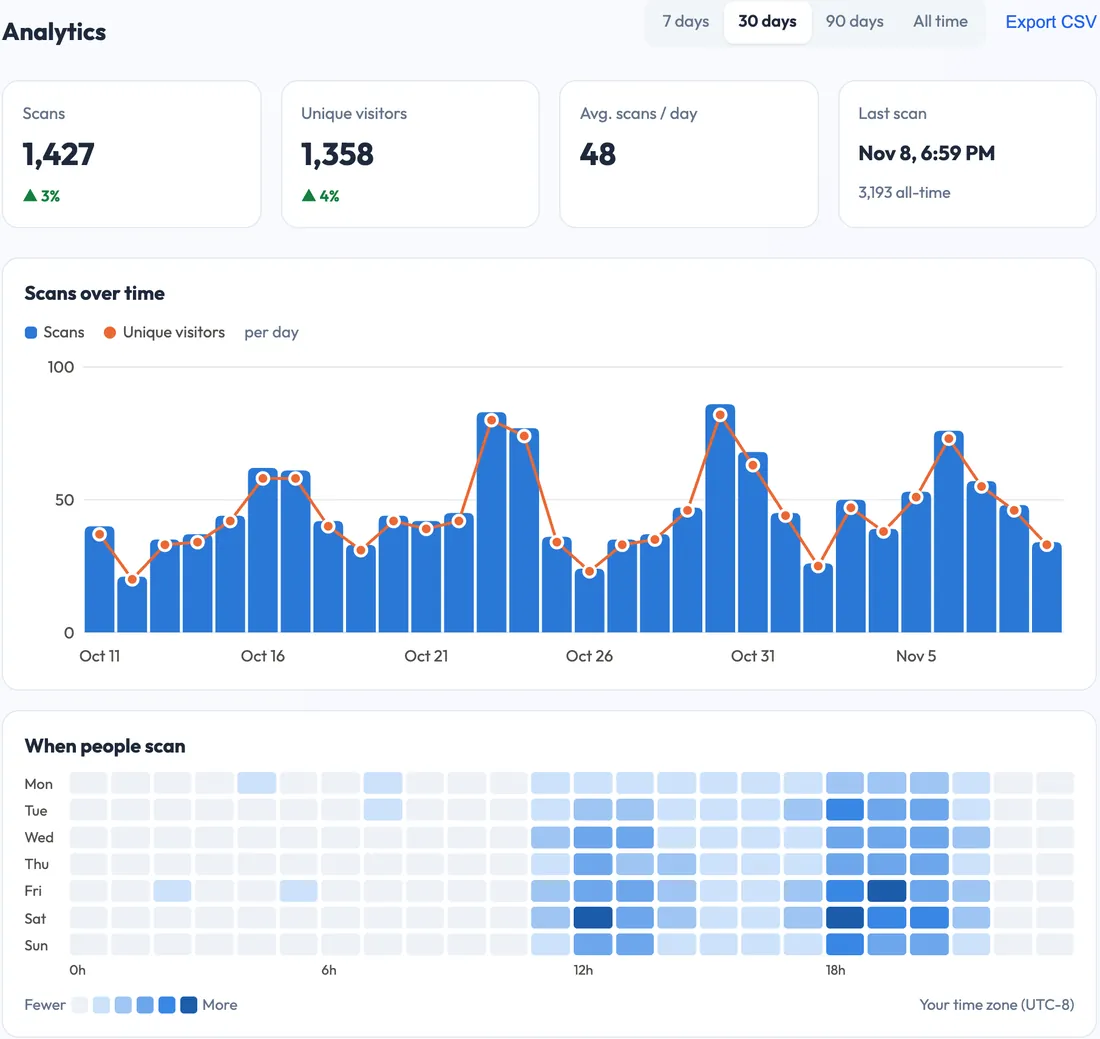
- Spot rush hours from the heatmap and plan staff around them.
- Compare areas: if the patio code barely gets scanned, maybe the tents are hidden or guests ask for paper menus there.
- Check languages and countries to see whether a translated menu is worth it.
- Export CSV to compare months.
Scans are not covers: one guest may scan twice, and a table of four may share one phone. Use the numbers for trends, not head counts.
Common QR menu mistakes
- A huge PDF. If the menu takes ten seconds to load on mobile data, guests give up and wave for a waiter.
- A static code pointing to a file name like "menu-final-v3.pdf". The next update breaks it.
- Low contrast. Gold codes on black card look elegant and scan badly in dim light.
- No fallback. No paper menus, no staff knowledge of the dishes.
- Codes from free generators that expire or start showing ads after a trial. Check before you print hundreds.
For the security side (stickers placed over your codes by someone else), read QR code security. Then make your first table code on the free dynamic QR code generator and test it at a table tonight.